Download ESP32 sketch · Download setup guide
GitFit — two-IMU arm tracker
Three.js viewer + ESP32 firmware, with BLE notifications and two-pose calibration with small-tremor tolerance. Open dist/index.html through a local web server (not file://), or use the hosted site. Settings includes an avatar motion preview without hardware. Full illustrated setup is in dist/guide.html.
Play online and deploy
Play GitFit · GitHub repository · Hardware setup guide
GitHub Pages serves the static dist/ folder over HTTPS. Use Chrome to connect the ESP32, or choose practice controls to play without hardware. The hosted site asks for its own Bluetooth device permission; localhost permissions and saved preferences do not carry over.
Every push to main runs the JavaScript checks, tests, and firmware-copy check, then publishes through .github/workflows/pages.yml. No package installation, backend, or build step is needed: Three.js and fonts are included locally. GitHub repository Settings → Pages must use GitHub Actions as its source. To retry a deployment, open Actions → Deploy GitFit to GitHub Pages → Run workflow. The site changes only after verification succeeds.
Motion Arcade
The home page has Zombie Boxing, Bird Flight, and Orbit Guard, with a live avatar in the lobby. Connection and calibration are shared across modes; switching games keeps the BLE connection. The two arm quaternions keep the same 20-byte packet layout. Updated flags and commands support two-pose calibration.
- Zombie Boxing: faster right-arm strikes deal 18–93 HP damage. Brawlers have 100 HP, runners have 70 HP and attack faster, and armored brutes have 220 HP and move slower. Early knockouts award 100 / 125 / 225 points respectively. Later waves add health. Five player health points; enemy hitboxes follow the animated body and account for each build. Zombies keep distinct approach angles. The avatar, view and punch collision coordinates turn together toward the next opponent after each knockout; sensor classification stays in the calibrated body frame. Keep facing the direction used for calibration.
- Orbit Guard: move the shield onto shrinking landing markers. Centered blocks earn extra points; four perfect blocks expand the shield for five seconds. Later waves mix arcing meteors with faster ion shots. Practice supports arrow keys, four direction buttons, and dragging the scene; the avatar hand follows the shield. Results track blocks, perfect blocks and best chain.
- Bird Flight: a Flappy Bird-style survival course. The first downstroke launches the run; waiting does not consume round time or fitness credit. Forward motion stays at 4 m/s; flaps only change altitude. Fly between the upper and lower obstacles. Clear a whole gap for 100 points; an obstacle or ground collision ends the run.
- Each round has a compact challenge: five zombie defeats, five flight gaps, or an eight-block chain. Results show your score, three game stats and round calorie estimates; Play again and Next game keep the demo moving.
- Each game has its own background score and layered action sounds: boxing percussion and impacts, flight wind and wingbeats, and shield blocks with perfect-block and surge cues.
- Impacts add sparks, expanding rings, directional enemy recoil and brief camera response. Flight gains peripheral speed streaks. Settings contains separate Music and Sound effects volumes, Impact effects, and Camera motion. Volume settings survive reload. Music starts after Play or a game-selection click; Pause and hidden tabs stop the soundtrack. Reduced-motion preferences disable the optional impact and camera effects by default.
- Live input: choose ESP32, connect and complete both calibration poses. Use straight forward jabs, lateral hook arcs, or upward uppercut arcs. Return to your guard or briefly settle between strikes. Face the same direction used at calibration. The left arm is an animated-model guard, not independently tracked.
- Keyboard / touch: an explicit simulation mode. Press Space or the Punch button. It never injects hits into live-input rounds.
- Escape or Pause freezes a round. Stale/invalid tracking and hidden tabs automatically pause live play; press Resume after recovery. Switching mode or input starts a new round.
Punch detection derives wrist motion from the two tracked segment orientations, uses swept collision tests, classifies trajectory shape, and allows one hit per stroke. Rest or recovery rearms the detector. It is a game heuristic, not a measured punching force. Keep space around you and use controlled movements. Live hardware punch feel still needs testing with the actual wearable.
Hardware and wiring
Assumption: a classic ESP32 DevKit/WROOM with Bluetooth LE, and two MPU6050 breakout modules (such as GY-521), not bare sensor chips. ESP32-S2 has no Bluetooth. Other ESP32 variants require checking their pinout and changing SDA_PIN/SCL_PIN.
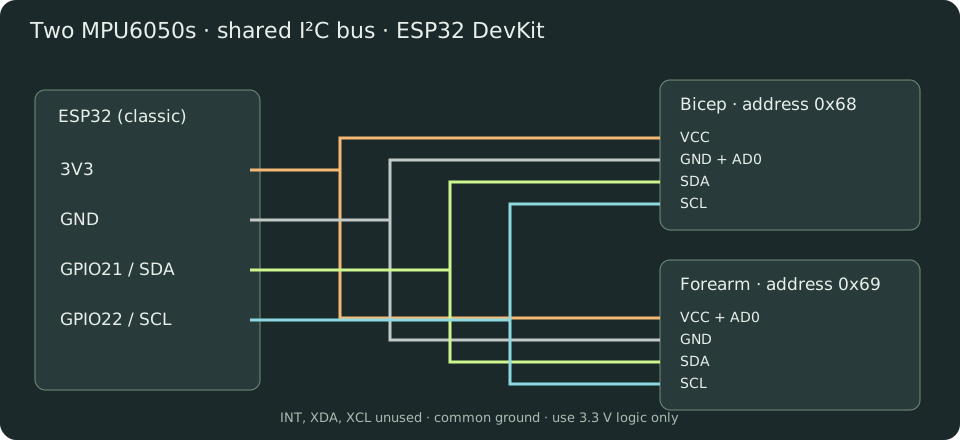
| ESP32 | Bicep MPU6050 | Forearm MPU6050 |
| 3V3 | VCC | VCC and AD0 |
| GND | GND and AD0 | GND |
| GPIO21 | SDA | SDA |
| GPIO22 | SCL | SCL |
Bicep address is 0x68; forearm is 0x69. Leave INT, XDA and XCL disconnected. Power off before wiring. Use common ground and 3.3 V pull-ups, never 5 V on ESP32 GPIO. Most breakouts already have pull-ups; check yours before adding any. The two breakout pull-ups appear in parallel, so check the combined resistance and remove redundant pull-ups if needed; do not blindly add another set. If absent, add one 4.7 kΩ SDA-to-3V3 and one SCL-to-3V3 resistor. Keep wires short, secured, and separated from high-current wiring. Long arm-length I²C cables can become unreliable at 400 kHz: reduce Wire.begin clock to 100000 if needed and measure the resulting sample rate. USB power from a power bank is convenient for a wearable demo. Insulate the boards.
Flash
1. Install Arduino IDE 2. Add https://espressif.github.io/arduino-esp32/package_esp32_index.json under Preferences → Additional Boards Manager URLs.
2. In Boards Manager install esp32 by Espressif Systems, version 3.x. Select ESP32 Dev Module for a classic ESP32; select the actual serial port.
3. Library Manager: install NimBLE-Arduino by h2zero, version 2.5.1. Wire is built in; no MPU library is needed. No heart-rate sensor library is needed. Firmware uses the NimBLE 2.x callbacks.
4. Open firmware/ArmTracker/ArmTracker.ino, upload, and open Serial Monitor at 115200 baud. If upload stalls, hold BOOT during connection and release once writing begins.
5. Expect MPU 0x68: OK, MPU 0x69: OK, and Ready. A missing sensor halts startup; fix wiring and reset. An MPU at 0x69 still normally reports WHO_AM_I 0x68.
Sensor mounting and two-pose calibration
Secure one MPU6050 to the right bicep and the other to the right forearm. Each board may be mounted in any fixed orientation; their printed axes do not need to line up. They must not slip between poses or during play. Both sensors must move with their own arm segment.
1. Arm-down: stand upright with your right arm straight at your side, fingertips pointing down and palm toward your thigh. Use Calibrate / Capture arm-down under your avatar and hold the pose comfortably for three seconds.
2. T-pose: after the first capture succeeds, extend your right arm sideways to your right at shoulder height, elbow straight and palm toward the floor. Keep facing the same direction. Click Capture T-pose and hold the pose comfortably for three seconds; small shakes are tolerated. Keep the thumb facing forward through the movement; do not twist the forearm independently.
3. When the capture completes and the button changes to Recalibrate, move normally or start a game. The display initially shows your current T-pose; lowering the arm brings it down in the viewer.
The firmware averages gravity and gyro readings for each pose, detects movement, and constructs a separate sensor-to-world mounting frame for each IMU. No hard-coded sensor axis is required. It learns gyro bias from both captures. The two known poses resolve the mounting orientation relative to your body; they do not measure compass heading, body translation, or arm length. Enter your arm lengths separately.
The first capture must be arm-down and the second a sideways right-arm T-pose. Both measured gravity directions must be roughly perpendicular. Similar/opposite poses are rejected. A bad T capture can be retried without recapturing arm-down; Cancel calibration discards both. Stability is evaluated throughout the capture using numerically stable running variance. Gyro standard deviation up to 0.20 rad/s and acceleration standard deviation up to 0.15 g are tolerated. Momentary spikes (under 150 ms) pause sample collection instead of resetting progress. Capture averages 600 accepted sample pairs, so a brief bump can extend the three-second hold slightly. Sustained movement, implausible acceleration, or continuous rotation still restarts the window. The instantaneous gyro limit is 0.95 rad/s; mean rotation over the capture is capped at 0.40 rad/s per axis. A restart identifies the upper-arm or forearm sensor and its reason on screen and in Serial Monitor. A capture times out after 20 seconds, allowing a retry. Minor gravity magnitude variation is tolerated; the old fixed -X gravity requirement is removed.
Two-pose calibration is required after startup or disconnection. The old startup bypass is removed. Sensor mounting frames and biases are kept in RAM. Recalibrate if a sensor slips, temperature changes noticeably, or yaw drifts. Six-axis MPU6050 sensors still cannot correct yaw drift indefinitely. Remain upright and avoid twisting your torso between captures.
The website checks a capability flag before allowing calibration. If it says to flash two-pose firmware, replace the entire old sketch with the current download and reconnect. This prevents the new UI from accidentally running the old one-pose calibration.
Browser and Bluetooth
1. Use Chrome on macOS, Windows, or a supported Android device, with Bluetooth enabled. Safari/Firefox and Chrome on iPhone/iPad do not provide this native Web Bluetooth flow. Linux support may require experimental features and an appropriate BlueZ setup; a supported desktop is easier.
2. Serve locally: python3 -m http.server 5173 --bind 127.0.0.1 --directory dist, then open http://localhost:5173 in Chrome. Node users can also run npm start if Python is installed. HTTPS hosting also works. Plain HTTP LAN IP addresses and file:// are not suitable. Open as a top-level page; embedded previews may block Bluetooth through Permissions Policy. The browser device picker requires a user click.
3. Click Connect arm under the avatar, then Find ESP32, select GitFit-ESP32, and approve the browser's device access. Do not pair through a Bluetooth Classic serial terminal: this uses BLE GATT. No PIN, serial COM Bluetooth port, Wi-Fi or backend is required. Existing firmware may still show the previous device name; it remains compatible. Upload the current sketch to update its advertised name.
4. Capture arm-down and then T-pose, then move. Enter measured shoulder-to-elbow and elbow-to-wrist distances in cm. Connection closes its dialog after success. Calibration instructions and the reference pose appear above your avatar without another dialog. Before calibration the avatar demonstrates the requested pose; after calibration it follows your right arm live.
5. To reconnect, use Connect again. Close other BLE clients if the board is unavailable; reset the board if necessary. After changing firmware services, remove the old site's Bluetooth permission or restart Bluetooth if the OS retains a stale GATT cache.
The app distinguishes demo, live, calibration and stale states. A packet gap of over 500 ms marks the display stale and freezes the last received pose. Last packet age is browser receive freshness, not measured sensor-to-screen latency. BLE access is local to your browser; this app sends no motion data to a backend. The prototype BLE service has no bonding or authentication: only use with a nearby trusted demo setup.
Tracking and latency
The MPU6050 is a six-axis accelerometer/gyro, with no magnetometer. Gyro integration plus proportional gravity correction estimates orientation. Gravity corrects tilt but cannot correct yaw. Independent sensors drift in heading, and acceleration can temporarily corrupt tilt. This is a prototype, not precision motion capture.
The shoulder is fixed. Elbow = shoulder + rotated upper-arm vector; wrist = elbow + rotated forearm vector. Both segment quaternions are absolute orientations in the same reference, so the forearm rotation is not incorrectly applied twice. Hand follows forearm; there is no wrist sensor. Body translation is not measured. Do not double-integrate acceleration to claim absolute position.
Targets: 200 Hz register sampling/fusion, 94 Hz gyro / 98 Hz accelerometer digital low-pass, 100 Hz BLE notification attempts. Each notification is 20 bytes and fits the default ATT MTU of 23: no MTU negotiation dependency. Requested connection interval is 7.5–15 ms, zero peripheral latency; the central OS chooses the actual interval. Loop scheduling, I²C and BLE can lower actual frequency. Rendering uses requestAnimationFrame and the newest orientation without a render smoothing queue. Motion analysis processes a bounded queue of received poses and applies an 18 ms smoothing time constant to reconstructed wrist positions. Nominal 100 Hz firmware sequence intervals provide analysis timing to reduce notification-burst artifacts; velocity is an estimate, not a raw accelerometer measurement. Camera damping does not smooth sensor motion. Packet handling updates orientations immediately; calibration/status labels and game HUD counters update at 10 Hz. Graphics defaults to Auto, starting at a maximum 1.5 pixel ratio and lowering resolution after sustained slow frames, then recovering gradually. Settings also offers fixed Low/High quality and rendering FPS/frame-time diagnostics. Those diagnostics measure rendering, not end-to-end sensor latency. Idle impact particles do not upload matrices. Static street, boxing and shield-arena scenery is batched into instanced draws; animated props stay separate. The lobby avatar caches layout bounds until resize/scroll/layout changes. Scene draw and geometry counts are available in Settings. No Wi-Fi radio is started.
Do not promise a particular end-to-end latency: measure physically (e.g. high-speed video of real arm + display). Monitor received rate, missing sequence numbers and packet age. Sequence numbers count attempted notifications and wrap at 65536. Missing packets include BLE enqueue/delivery losses; this is not an RF-only metric. Main-loop stalls over 25 ms invalidate calibration to avoid integrating an unreliable interval. Runtime I²C failures invalidate calibration and display a fault.
Binary protocol
Service: 8c310001-7a94-4b2d-b7bb-5de91f2d9a10
Notify: 8c310002-7a94-4b2d-b7bb-5de91f2d9a10
Control (write with response): 8c310003-7a94-4b2d-b7bb-5de91f2d9a10
Control 0x01 starts a fresh arm-down capture; 0x02 captures T-pose after a successful arm-down capture; 0x03 cancels calibration. A GATT write acknowledges receipt; notifications report the current phase, progress, and completion.
| Bytes | Meaning |
| 0–1 | uint16 little-endian notification sequence |
| 2 | flags: bit0 calibrated, bit1 capturing, bit2 sensor fault, bit3 rejected, bit4 arm-down saved/T next, bit5 capturing T, bit6 invalid pose geometry, bit7 two-pose firmware |
| 3 | 0–100: capture percent; 129–136: restart diagnostic codes |
| 4–11 | bicep quaternion w,x,y,z; signed int16 LE divided by 32767 |
| 12–19 | forearm quaternion w,x,y,z; same encoding |
Diagnostic codes 129–132 identify upper-arm rotation, gyro instability, acceleration instability, or invalid acceleration range. Codes 133–136 mean the same issues for the forearm. Diagnostic codes are displayed as messages, never percentages.
Firmware sends reference-relative world rotations. Internal axes are X right, Y forward, Z up. Browser maps them to Three.js by conjugation with a -90° X rotation (X right, Y up, Z backward).
Verification and dependencies
npm test runs binary decoder and sequence-wrap tests; npm run check checks JavaScript syntax. Three.js 0.180.0 and the DM Sans / Space Grotesk fonts are bundled in dist/vendor, with their licenses and package-integrity records. Game startup does not fetch engine code or fonts from external CDNs. Firmware is compile-checked for esp32:esp32:esp32 using Arduino-ESP32 3.3.11 and NimBLE-Arduino 2.5.1. scripts/test-calibration-math.py compiles the actual quaternion math from the sketch and tests 2,000 different sensor mounting orientations, current T-pose initialization, degenerate-pose rejection, small-tremor acceptance and large-movement rejection. JavaScript tests cover the calibration flow, game logic and packet decoding. Actual wearable accuracy and motion performance still require testing on your boards; no hardware was flashed during authoring.
Sources
- Espressif Arduino installation
- NimBLE-Arduino 2.3.6 server callbacks
- MPU6050 product specification
- TDK MPU6050 product information
- Chrome supported device connection instructions
Motion arcade and activity estimates
Choose Zombie Boxing, Bird Flight, or Orbit Guard. The same calibrated arm connection stays active across all three. Flight uses downward wrist strokes for lift while advancing automatically; Orbit Guard follows hand position. Large in-game counters show estimated session calories and wrist speed, or forward flight speed in Bird Flight.
Keyboard/touch mode offers Space or Strike for punches and swings. Choose Jab, Hook, or Uppercut and a practice effort level for boxing. In Bird Flight, Space, Flap, or tapping the scene produces a downstroke; left/right inputs do not steer. Orbit Guard uses arrows or dragging to position the shield. Pause or Escape freezes a round; switching games starts a new round. Lost tracking and hidden tabs pause automatically. Use the camera selector, camera motion checkbox, sound toggle, and fullscreen control to suit your setup. Personal best scores are stored separately for live versus practice and Quick versus Standard rounds; abandoning a round does not overwrite a record. Earlier mixed-input records remain in browser storage but are not automatically assigned to either input mode. Weight preference is also stored locally. Sound starts after pressing Play.
The session calorie tracker estimates gross energy using weight in kg × selected MET × live active play hours. Choose an assumed effort level in Settings. It is not measured energy expenditure and does not use a heart-rate sensor. Paused, disconnected, hidden-tab, and keyboard/demo time do not count. Remaining still during an active live round still counts as play time, so pause during rests. Changes to settings apply prospectively. Session totals reset on page reload or Reset session. MET background: Compendium of Physical Activities.
Boxing and fitness interface
The arcade opens directly into a full-window game lobby. Play, a single-game selector with left/right arrows, and time and calorie targets are on the left. Only the selected game name and position are shown; category tags and promotional copy are omitted. The arrows cycle through all three games and wrap at either end. Keyboard arrow keys work while the selector is focused. A stylized person with a face, clothing and a tracked right arm stands on the right. The selected game’s actual 3D world fills the background. Connect arm opens a connection-only dialog; calibration stays in the lobby. Settings contain input mode (including keyboard/touch Practice), best score, weight, effort, camera, demo and session reset controls. Pose instructions and capture progress appear only when needed; the idle lobby keeps the avatar clear. Targets track cumulative live play across rounds. The separate Round setting defaults to Quick (45 seconds) for a short demonstration; Standard restores each game’s normal time/survival rules. Practice does not add time or calories.
Boxing uses articulated stylized zombie models, detailed gloves and wraps, walking and attack wind-up animations, hit recoil, and falling knockouts. Faster reconstructed wrist movement deals more damage. The default First person view hides the player’s head and torso. First person · focus opponent follows the next living enemy; Close shoulder view is also available. Turn off Camera motion for a steady view. Procedural effects include punch whooshes, layered impacts, footsteps, a round bell, and knockouts. Mute with Sound on/off. Real sensor movement drives the right arm directly; eased punch animation applies to keyboard/touch practice.
Gesture controls and fullscreen
Boxing classifies a short history of reconstructed wrist velocity directions: a straight forward path is a jab, a lateral arc is a hook, and an upward arc is an uppercut. It compares path straightness, axis travel and the turn between early and late velocity directions. Ambiguous movements are not awarded a punch. Small resting noise, stale samples, and recovery motion are filtered. An 8 cm retraction from the extended stroke rearms another punch without returning to the exact original guard or pausing perfectly still. Separate head and torso collision capsules follow the animated zombie bones, include the glove’s size, and test the whole stroke path when its shape is first recognized. Fast punches and punches starting inside a close opponent still register once per stroke. This is a game heuristic based on the two segment orientations and entered arm lengths, not a measurement of impact force. The on-screen speed is explicitly estimated. Test and adjust your physical pose after calibration; actual wearable feel has not been verified on hardware here.
Bird Flight uses only vertical downstroke strength for lift. Harder flaps rise more; recovering upward adds no lift, and gravity pulls the bird down between strokes. Forward motion stays at 4 m/s, and sideways or backward movement cannot steer or accelerate it. Upper and lower obstacle pairs form a changing vertical gap, with slightly narrower openings as the run progresses. Collision checks include the full obstacle depth and the bird’s body radius; points are awarded once the entire obstacle is cleared. A ground or obstacle hit ends the run. The sky limit caps height without an invisible collision. Wings remain in view in first person; the HUD shows distance and cleared gaps instead of a countdown.
Play enters the game and requests fullscreen automatically. Use Fullscreen in the bottom-right to toggle it again, or Lobby to return to your avatar. Exit, pause/resume and practice strike/flap controls stay inside the fullscreen view. When native fullscreen is unavailable or stalls in an embedded browser, the game immediately expands to fill the page instead. Escape exits this expanded fallback and pauses. The less-sensitive calibration update requires uploading the current ArmTracker sketch again. This firmware change relaxes pose stability and skips brief outliers; sensing, fusion, notification rates and the BLE packet format are unchanged.
Short hackathon demonstration
Keep Round set to Quick (45 seconds). Connect the arm and complete both calibration poses before the presentation. Boxing demonstrates different enemy builds, automatic turns and speed-based damage. Flight waits for your first flap, while Orbit Guard demonstrates accurate blocks and a larger shield after four perfect catches. Use Play again or Next game between demonstrations; Bluetooth stays connected. Practice is visibly labeled and never counts calories. Engine, fonts and music use local assets.